- Home Page /
- Mobile Phone Accessories /
- Accessories /
- Gaming Accessories /
- Controllers /
- Auto Clicker for iPhone iPad, Simulated Finge...
0 ratings

Item #:
86197441
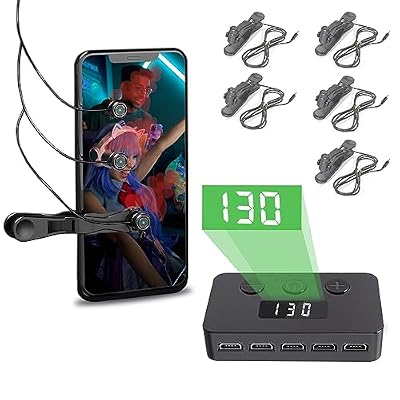
Auto Clicker for iPhone iPad, Simulated Finger Continuous Clicking, Phone Screen Device Speed Clicker for Android IOS, Adjustable Automatic Physical
Item #:
86197441
GBP 65
Price Details
Excluding Shipping & Custom charges ( Shipping and custom charges will be calculated on checkout )
*All items will import from US
0 ratings
Write a review
In stock
 Imported from USA store
QTY:
Order now and get it around Friday, July 24
Secured transaction
Ubuy works hard to protect your security and privacy. Our advanced payment security system ensures confidentiality by encrypting your information during transmission using AES (Advanced Encryption Standards) and SSL (Secure Socket Layer) protocols. Your payment details are 100% secure as we do not share your payment details with third party sellers.
Our Top Logistics Partners


Release your finger and let the ARB-3727-F Auto Clicker save you time with its adjustable speed for all your gaming and broadcasting needs.

Fast
Shipping

Free
Return*

Secure Packaging

100% Original Products

PCI DSS Compliance

ISO 27001 Certified


Note: Step Down Voltage Transformer required for using electronics products of US store (110-120). Recommended power converters Buy Now.


What Stands Out
Versatile Compatibility
Designed for both iPhone and Android devices, this auto clicker seamlessly adapts to various platforms, making it perfect for games, live broadcasts, and task automation across multiple operating systems.
Speed Control
Offering adjustable speeds up to 30 clicks per second, users can customize the tapping frequency to suit different applications, enhancing efficiency during gaming and multitasking scenarios.
User-Friendly Design
With a simple setup process and intuitive interface, this auto clicker ensures that users of all skill levels can easily utilize its powerful features without a steep learning curve.
Product Details
| Item Weight | 1 lbs (450 grams) |
Who Should Buy?

-
Mobile Gamers
Ideal for gamers needing rapid tapping for actions like shooting or collecting items within games.
-
Live Streamers
Perfect for streamers requiring frequent taps for audience interactions or game notifications during broadcasts.
-
Task Automation
Useful for users wanting to automate repetitive tasks such as clicking through rewards or daily tasks.

-
Casual Users
Not suitable for users who rarely engage in clicking tasks and prefer manual control over their device.
-
Non-Gamers
Users not involved in gaming or automated tasks may find this tool unnecessary and irrelevant for their needs.
-
Older Devices
May not perform well on older devices due to compatibility issues, limiting its functionality.
Product Description
Auto Clicker for iPhone iPad, Simulated Finger Continuous Clicking, Phone Screen Device Speed Clicker for Android IOS, Adjustable Automatic Physical Tapper,Suitable for Games, Live Broadcasts, Reward Tasks1 Second Fastest 30 Times
Have any Query? Chat with us
Customer Questions & Answers
-
Question:
What is an Auto Clicker and how does it work?
Answer: An Auto Clicker is an application designed to simulate repeated tapping or clicking on your mobile device's screen. It works by automating the touching process, allowing users to set specific intervals for clicks, reducing the strain on your fingers during repetitive tasks. This tool is particularly useful in mobile gaming, where you need to perform constant taps or for filling out forms quickly. Users can personalize the click's speed and duration, making it effective for various uses, whether for gaming or productivity. -
Question:
Can I use an Auto Clicker on both iOS and Android devices?
Answer: Yes, the Auto Clicker is compatible with both iOS and Android devices. This versatility makes it a valuable tool for anyone looking to enhance their mobile experience, whether you're using an iPhone, iPad, or an Android phone or tablet. The installation process and functionality may differ slightly between platforms, so it's advisable to follow the specific instructions for your device to ensure optimal performance. -
Question:
Is an Auto Clicker safe to use?
Answer: Yes, using a reputable Auto Clicker is generally safe, but it's important to download applications from trusted sources. This minimizes the risk of malware or unwanted permissions. Most users report a positive experience, using it for gaming or automating tasks without facing security issues. However, it's wise to be cautious with permissions and to review user feedback to ensure you're selecting a reliable app. -
Question:
How can an Auto Clicker improve my mobile gaming experience?
Answer: An Auto Clicker can significantly enhance your mobile gaming experience by automating repetitive tasks such as grinding for resources or tapping through dialogues. This allows you to focus on strategy and gameplay rather than finger fatigue. By adjusting the frequency and duration of clicks, you can optimize your performance in various games. It's particularly beneficial for games that require quick reflexes or continuous input, making it a favorite among serious gamers. -
Question:
What features should I look for in an Auto Clicker?
Answer: When choosing an Auto Clicker, look for features such as adjustable click speed, multiple click patterns, and user-friendly interfaces. Some Auto Clickers also offer scripting capabilities, enabling advanced users to create custom automation sequences. It's also helpful if the Auto Clicker allows for varying durations and types of clicks, providing versatility for different applications, from gaming to productivity tasks. Easy configuration settings can further enhance user experience. -
Question:
Can I customize the clicking speed in the Auto Clicker?
Answer: Yes, most Auto Clickers allow you to fully customize the clicking speed to suit your needs. This feature is essential as it lets you adjust the frequency of clicks based on what you're using the tool for. Whether you require rapid clicks for a fast-paced game or slower, deliberate clicks for filling out forms, customizable speed ensures you have complete control over the automation process. -
Question:
Will an Auto Clicker drain my device's battery?
Answer: While an Auto Clicker does use some battery power due to continuous screen activity, its impact is generally minimal. To mitigate battery drain, it’s recommended to close unnecessary applications and limit the duration of the clicking activity. Users typically find that the benefits of increased efficiency and reduced physical strain outweigh any minor battery consumption, making it a practical tool for enhancing productivity and gaming. -
Question:
Can I set a timer for my Auto Clicker?
Answer: Yes, many Auto Clickers come equipped with a timer feature that allows you to specify how long you want the clicking to continue. This is useful for both gaming sessions, where you might want to automate tasks for a set period, and for productivity, allowing you to automate clicks while you focus on other important tasks. By setting a timer, you can easily manage your screen time and avoid unintended continuous input. -
Question:
Where can I buy Auto Clicker for iPhone iPad, Simulated Finger Continuous Clicking for Android IOS?
Answer: You can buy the Auto Clicker for iPhone and iPad, as well as for Android devices, on Ubuy. They have a wide selection of automation tools and apps designed for both iOS and Android platforms. This platform is known for its user-friendly experience and reliable sourcing. By purchasing through Ubuy, you can easily find the right Auto Clicker to enhance your mobile device functionality. -
Question:
Are there any specific apps recommended for using Auto Clicker?
Answer: While there are various Auto Clicker apps available, some popular recommendations include *Auto Clicker - Automatic Tap* for Android and *AutoTouch* for iOS. These applications are well-reviewed for their ease of use and functionality. The best choice often depends on individual needs, whether you're focusing on gaming, automation tasks, or both. Be sure to check compatibility and user ratings to find the best option for your specific use case.
Annrybor Controllers Editorial Review
No editorial reviews found
Customer Reviews & Ratings
1 customers ratings
-
5 Star
100%
-
4 Star
0%
-
3 Star
0%
-
2 Star
0%
-
1 Star
0%
Review this product
Share your thoughts with other customers
Pros
- Highly customizable click speed
- Easy to use interface
- Works well on multiple devices
- Reduces finger fatigue
- Durable and reliable performance
Cons
- Limited advanced features
Product Price History
Important information
- Limitations : For products shipped internationally, please note that any manufacturer warranty may not be valid; manufacturer service options may not be available; product manuals, instructions, and safety warnings may not be in destination country languages; the products (and accompanying materials) may not be designed in accordance with destination country standards, specifications, and labeling requirements; and the products may not conform to destination country voltage and other electrical standards (requiring use of an adapter or converter if appropriate). The recipient is responsible for assuring that the product can be lawfully imported to the destination country. When ordering from Ubuy or its affiliates, the recipient is the importer of record and must comply with all laws and regulations of the destination country.
- Not all the products listed on Ubuy are for sale, as Ubuy is a global search engine. Products are subject to export/trade regulations.
GBP 65
Order now and get it around Friday, July 24
This item is not restrict in my country.(Please click on above link if this item is not restrict in your country, So our team will review and allow.)
QTY:
Secured transaction
Ubuy works hard to protect your security and privacy. Our advanced payment security system ensures confidentiality by encrypting your information during transmission using AES (Advanced Encryption Standards) and SSL (Secure Socket Layer) protocols. Your payment details are 100% secure as we do not share your payment details with third party sellers.
Our Top Logistics Partners
Fastest cross-border delivery
Features & Benefits
- Fastest clicking speed of 30 times per second.
- Supports both sticky and clip-on methods for easy use.
- Compatible with multiple devices including Android and iOS.
- Features anti-cheat protection to bypass game detection.
- Includes comprehensive package with multiple accessories.
- Perfect gift choice for gamers and broadcast enthusiasts.