- Home Page /
- Electronics /
- Television & Video /
- Television Accessories /
- Remote Controls /
- Replace Learning Remote Control Fit for Dream...
0 ratings

Item #:
83572165
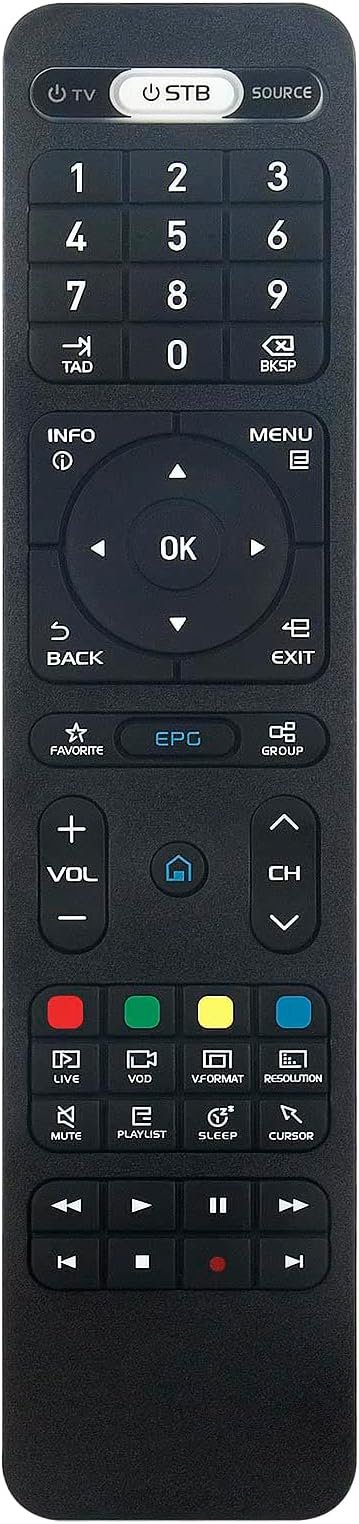
Replace Learning Remote Control Fit for Dreamlink T3 / T2+ / T1 | T1 Plus / Dlite+, Replacement Compatible with Formuler Z8, Z8 pro, Z Alpha, Z7+, Z+
Item #:
83572165
GBP 13
Price Details
Excluding Shipping & Custom charges ( Shipping and custom charges will be calculated on checkout )
*All items will import from US
0 ratings
Write a review
In stock
 Imported from USA store
QTY:
Order now and get it around Thursday, September 17
Secured transaction
Ubuy works hard to protect your security and privacy. Our advanced payment security system ensures confidentiality by encrypting your information during transmission using AES (Advanced Encryption Standards) and SSL (Secure Socket Layer) protocols. Your payment details are 100% secure as we do not share your payment details with third party sellers.
Our Top Logistics Partners


Perfect solution to replace old or broken remote.

Fast
Shipping

Free
Return*

Secure Packaging

100% Original Products

PCI DSS Compliance

ISO 27001 Certified


Note: Step Down Voltage Transformer required for using electronics products of US store (110-120). Recommended power converters Buy Now.


What Stands Out
Universal Compatibility
Designed specifically for Dreamlink T3, T2+, T1 Plus, and T1, this remote control seamlessly replaces existing ones without complexities or additional settings.
User-Friendly Design
Featuring a smart programmable interface, this remote requires no setup, making it easy for anyone to use and enhancing your entertainment experience instantly.
High-Quality Build
Crafted with durable materials, the Beyution remote ensures longevity and reliability, providing exceptional value and performance for your home entertainment needs.
Product Details
| Additional Features | Ergonomic |
| Maximum Number of Supported Devices | 1 |
| Compatible Devices | Set Top Box |
| Connectivity Technology | Infrared |
| Button Quantity | 20 |
| Controller Type | Button Control |
| Maximum Range | 33 feet |
| Number of Batteries | 2 AAA batteries required. |
| Battery Type | Alkaline |
| Color | Black |
| Brand | Beyution |
| Model Name | T3 |
| Model Number | WY-MBE1081-US |
| Manufacturer | Beyution Factory |
| Mfr Part Number | WY-MBE1081-US |
| Item Weight | 1.9 ounces (53.87 grams) |
| Item Dimensions L x W x H | 5"L x 1"W x 0.5"H (12.7 x 2.5 x 1.3 cm) |
| Special Feature | Ergonomic |
| Max Number of Supported Devices | 1 |
Who Should Buy?

-
Ease of Use
Ideal for users seeking a straightforward remote without complex setup requirements. Plug and play functionality simplifies operations.
-
Multiple Device Owners
Perfect for users with multiple Dreamlink devices needing a versatile remote to control them seamlessly and conveniently.
-
Replacement Needs
Great for individuals needing a replacement remote due to loss or damage, ensuring continued access to their devices.

-
Advanced Features
Not suitable for users who require advanced functions like programmable macros or extensive customization options in a remote.
Product Description
Replace Learning Remote Control Fit for Dreamlink T3 / T2+ / T1 | T1 Plus / Dlite+, Replacement Compatible with Formuler Z8, Z8 pro, Z Alpha, Z7+, Z+ Nero
Have any Query? Chat with us
Customer Questions & Answers
-
Question:
What devices are compatible with the Beyution Replace Learning Remote Control?
Answer: The Beyution Replace Learning Remote is designed to fit specifically with the Dreamlink T3, T2+, T1 Plus, and T1 models. This makes it an ideal replacement for users who have one of these devices. The learning functionality enables it to replicate commands from existing remotes seamlessly, allowing for convenient control of various functions. -
Question:
Do I need to set up the Beyution remote before using it?
Answer: No setting is required with the Beyution Replace Learning Remote. It is designed for immediate use with compatible devices as it operates on a simple plug-and-play principle. Users can start using it right out of the box, thanks to its smart programmable features, ensuring an instant solution to remote control needs without a complicated setup process. -
Question:
Can I program the Beyution Replace Learning Remote to control other devices?
Answer: Yes, the Beyution Replace Learning Remote can learn commands from other remotes, allowing it to control additional devices beyond the Dreamlink models. This flexibility makes it a versatile addition to your home entertainment system as it can consolidate multiple remote functions into one device, reducing clutter and simplifying your remote control experience. -
Question:
Is the Beyution remote suitable for elderly users?
Answer: Absolutely! The intuitive design of the Beyution Replace Learning Remote, paired with its no-setup requirement, makes it particularly user-friendly for elderly individuals. Its larger buttons and straightforward functionality allow for easy navigation, eliminating the complexities that often come with other remotes, thus enhancing the convenience of operating their devices. -
Question:
How does the learning feature of the Beyution remote work?
Answer: The learning feature of the Beyution Replace Learning Remote is quite simple and efficient. It allows the remote to learn commands from your existing remotes by pointing them at each other. By pressing the corresponding buttons, the Beyution can mimic the functions of other remotes seamlessly, thereby streamlining the control process for your entertainment devices. -
Question:
What is the range of the Beyution Learning Remote?
Answer: The Beyution Replace Learning Remote has an effective range typical of infrared remotes, which is usually about 10 to 20 meters, depending on the specific device you are controlling. This allows users to operate their Dreamlink devices from a comfortable distance, giving them the freedom to lounge or move about without being tethered to their devices. -
Question:
Does the Beyution remote require batteries?
Answer: Yes, the Beyution Replace Learning Remote does require batteries to operate. Most users rely on standard AA or AAA batteries, which are easy to replace when needed. This ensures that the remote remains functional; however, it’s good practice to keep some spare batteries handy to ensure uninterrupted use when you need to control your Dreamlink devices. -
Question:
What features make the Beyution remote better than traditional remotes?
Answer: The Beyution Replace Learning Remote stands out due to its smart programmable learning function, which allows it to adapt to various devices easily. Unlike traditional remotes that are often limited to one device, this learning remote can replace multiple remotes, making it a more versatile and organized solution for users who prefer minimalism in their remote collection. -
Question:
How can I troubleshoot issues with the Beyution Replace Learning Remote?
Answer: If you experience issues with the Beyution Replace Learning Remote, first ensure that it has fresh batteries installed. If the remote is still not functioning, check if the device it’s controlling is compatible and properly powered on. Sometimes, re-learning commands will resolve issues; simply hold the original remote near the Beyution remote and reprogram it to ensure it captures the necessary signals accurately. -
Question:
Where can I buy Beyution Replace Learning Remote Control in Jersey?
Answer: You can purchase the Beyution Replace Learning Remote Control at Ubuy. Ubuy offers a seamless shopping experience, providing access to a wide range of products including this versatile remote, ensuring you can find exactly what you need without hassle.
Beyution Remote Controls WY-MBE1081-US Editorial Review
No editorial reviews found
Customer Reviews & Ratings
1 customers ratings
-
5 Star
0%
-
4 Star
100%
-
3 Star
0%
-
2 Star
0%
-
1 Star
0%
Review this product
Share your thoughts with other customers
Pros
- Easy to use
- No setup required
- Compatible with multiple devices
- Programmable features
- Compact design
Cons
- Limited battery life.
Platform Trust & Buyer Confidence

MA
Mohammad
Verified buyer
“Excellent quality and original too,when ubuy send original things I will appreciate that ,I very satisfied thank you”
23 July 2026 · via Trustpilot
CK
Chitra
Verified buyer
“The order and delivery progress was communicated very well. Package arrived within the estimated time. Products arrived as expected in good condition.”
22-Jul-26 · via Trustpilot
K
kund
Verified buyer
“Good supply of products. Safe payment methods, and shipment worldwide! Genuine products.”
23-Jul-26 · via Trustpilot
OO
Onesi
Verified buyer
“Was my first time buying a product from Ubuy, but I found it so helpful. This is reliable. Gonna place a new order!”
22 July 2026 · via Trustpilot
SJ
SAO JOHN
Verified buyer
“Ubuy is a great online platform to buy stuff. Reliable, fast delivery time and great value for money. I've been using Ubuy online shopping platform for three years now and will continue to do so.”
23 July 2026 · via Trustpilot
Secure Checkout
Global Delivery
Easy Returns
Genuine Products
Product Price History
Important information
- Limitations : For products shipped internationally, please note that any manufacturer warranty may not be valid; manufacturer service options may not be available; product manuals, instructions, and safety warnings may not be in destination country languages; the products (and accompanying materials) may not be designed in accordance with destination country standards, specifications, and labeling requirements; and the products may not conform to destination country voltage and other electrical standards (requiring use of an adapter or converter if appropriate). The recipient is responsible for assuring that the product can be lawfully imported to the destination country. When ordering from Ubuy or its affiliates, the recipient is the importer of record and must comply with all laws and regulations of the destination country.
- Not all the products listed on Ubuy are for sale, as Ubuy is a global search engine. Products are subject to export/trade regulations.
GBP 13
Order now and get it around Thursday, September 17
This item is not restrict in my country.(Please click on above link if this item is not restrict in your country, So our team will review and allow.)
QTY:
Secured transaction
PCI DSS compliant and ISO 27001:2022 certified, with encrypted payments and full buyer protection on every order.
Our Top Logistics Partners
Fastest cross-border delivery
Features & Benefits
- Smart programmable remote control with no setting required.
- Compatible with Dreamlink T3, T2+, T1 Plus, and T1 models.
- Lightweight and ergonomic design for easy gripping.
- Far-reaching performance up to 10 meters.
- Quick response with excellent button elasticity.
- Responsive after-sales service guaranteed within 24 hours.
Ubuy Assurance
Experience worry-free shopping with 100% original products, PCI DSS-compliant payment security, ISO 27001-certified data protection, the fastest cross-border delivery, free returns *, and secure packaging on every order.