0 ratings

Item #:
22657145
Microsoft Surface Dock
Item #:
22657145
GBP 73
Price Details
Excluding Shipping & Custom charges ( Shipping and custom charges will be calculated on checkout )
*All items will import from US
0 ratings
Write a review
In stock
 Imported from USA store
QTY:
Order now and get it around Friday, July 03
Secured transaction
Ubuy works hard to protect your security and privacy. Our advanced payment security system ensures confidentiality by encrypting your information during transmission using AES (Advanced Encryption Standards) and SSL (Secure Socket Layer) protocols. Your payment details are 100% secure as we do not share your payment details with third party sellers.
Our Top Logistics Partners


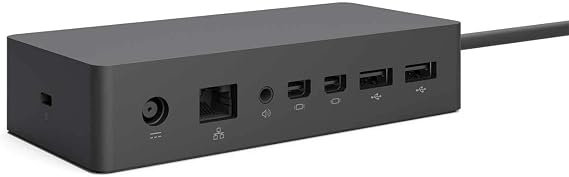
All the ports you need - with two high-definition video ports, a gigabit Ethernet port, four high-speed USB 3.0 ports and an audio output

Fast
Shipping

Free
Return*

Secure Packaging

100% Original Products

PCI DSS Compliance

ISO 27001 Certified


Note: Step Down Voltage Transformer required for using electronics products of US store (110-120). Recommended power converters Buy Now.


What Stands Out
Versatile Connectivity
The Microsoft Surface Dock offers numerous ports, including USB-C and USB-A, ensuring seamless connectivity with multiple devices, enhancing productivity in any workspace.
High-Speed Data Transfer
With Thunderbolt 3 compatibility, the dock enables rapid data transfer and high-resolution video output, significantly improving the efficiency of data-heavy tasks.
Power Delivery
The dock provides power delivery to charge your Surface device while in use, eliminating the need for multiple power adapters and simplifying your workspace setup.
Product Details
- Includes all the ports you need for your Microsoft Surface device
- Features two high-definition video ports for enhanced display quality
- Gigabit Ethernet port for faster internet connectivity
- Four high-speed USB 3.0 ports for quick data transfer
- Audio output for connecting headphones or speakers
- Minimalist design and easy setup using Surface Connect technology
| Item Weight | 1.1 lbs (500 grams) |
Who Should Buy?

-
Remote Workers
Ideal for remote workers needing multiple ports to connect monitors, keyboards, and other peripherals for productivity.
-
Creative Professionals
Great for designers and video editors requiring high-resolution monitors and quick data transfer speeds for their projects.
-
Business Users
Suitable for business environments integrating Surface devices with existing office setups using various connections and docking capabilities.

-
Casual Users
Casual users who only require minimal connectivity options may find the dock unnecessary and overly complex.
-
Budget-Conscious
Users on a tight budget might find alternative docking solutions offer similar functionality at a lower price point.
-
Mobile Workers
Individuals who frequently travel may prefer a more portable solution rather than a stationary dock setup.
Product Description
Microsoft Surface Dock
About This Item
Enhance your Microsoft Surface experience with the Microsoft 1661 Surface Dock. This docking station is designed to elevate your productivity by providing a seamless connection between your Surface device and multiple peripherals. The Microsoft 1661 Surface Dock features a sturdy and compact design that makes it easy to set up and use. Simply connect your Surface device to the dock and instantly expand its capabilities.
With a single connection, you can connect to two high-definition monitors, a full-sized keyboard, a mouse, and more. Experience the convenience of a versatile workstation with the Microsoft 1661 Surface Dock. It offers a variety of ports to meet all your connectivity needs. With two high-definition video ports, a Gigabit Ethernet port, four USB 3.0 ports, an audio output, and an audio input, you'll never have to worry about running out of connectivity options. The Microsoft 1661 Surface Dock is designed to be compatible with Microsoft Surface Pro, Surface Pro 3, Surface Pro 4, and Surface Book.
It's the perfect accessory for professionals, students, and anyone who needs to streamline their workflow. Take your productivity to the next level with the Microsoft 1661 Surface Dock. Upgrade your Surface device today and unlock its full potential.
Have any Query? Chat with us
Customer Questions & Answers
-
Question:
What is the Microsoft Surface Dock used for?
Answer: The Microsoft Surface Dock is designed to expand the capabilities of Surface devices, converting them into desktop workstations. It connects your Surface device to multiple external monitors, USB peripherals, and an Ethernet connection, streamlining your workspace. It’s ideal for users who require a dual-monitor setup for productivity, or who benefit from connecting additional devices, such as printers or external storage, enhancing both performance and usability. -
Question:
What ports are available on the Microsoft Surface Dock?
Answer: The Microsoft Surface Dock comes equipped with multiple ports, including two Mini DisplayPorts, four USB 3.0 ports, and an Ethernet port. This variety allows users to connect various devices simultaneously. For instance, you can connect two monitors for a more efficient workflow, as well as other devices like keyboards, mice, and external drives. This expansion capability is essential for users needing maximum connectivity in a cohesive workspace. -
Question:
Does the Microsoft Surface Dock charge my Surface device?
Answer: Yes, the Microsoft Surface Dock is capable of charging your Surface device while it is connected. This means you can keep your device powered without needing a separate power adapter. This is especially useful for professionals who need to ensure their devices remain charged throughout the day without interruptions during work. It simplifies the process of transitioning from mobile to desktop modes effortlessly. -
Question:
Is the Microsoft Surface Dock compatible with all Surface models?
Answer: The Microsoft Surface Dock is primarily compatible with Surface Book, Surface Pro 3, Pro 4, Pro 5, Pro 6, Pro 7, and Surface Laptop models. However, it is not compatible with the original Surface or Surface 2. For users looking to maximize their Surface’s potential, verifying compatibility ensures you can take full advantage of the docking station's features, improving your productivity and workspace versatility. -
Question:
How do I set up the Microsoft Surface Dock?
Answer: Setting up the Microsoft Surface Dock is a straightforward process. Simply plug the dock into a power source and connect your Surface device using the Surface Connect cable. From there, you can attach peripherals such as monitors and USB devices. Users benefit from a more organized and efficient workspace without wrestling with multiple cords or connections. Once set up, a seamless integration of your devices is achieved, perfect for both work and leisure. -
Question:
Can I use the Microsoft Surface Dock with multiple displays?
Answer: Absolutely! The Microsoft Surface Dock can support dual monitors via its two Mini DisplayPorts. This feature allows users to enhance their productivity, particularly in creative fields or complex data analysis where real estate on screens is essential. For those who perform multitasking or require enhanced visual workspace for software applications, dual displays create a more efficient and organized environment. -
Question:
What power requirements does the Microsoft Surface Dock have?
Answer: The Microsoft Surface Dock requires a power outlet to function properly. It is equipped with its own power supply that not only powers the dock but also charges your Surface device while connected. This feature is beneficial for users who spend significant time in front of their computers and want to eliminate interruptions due to low battery, making it an essential accessory for everyday use in office environments. -
Question:
Can the Microsoft Surface Dock be used for gaming?
Answer: While primarily designed for professional productivity, the Microsoft Surface Dock can be utilized for gaming purposes too. If you connect compatible gaming peripherals and external monitors, it can enhance your gaming experience by providing a larger display and better input devices. Users looking to integrate their gaming setup with workstations can seamlessly switch between tasks without needing to disconnect and reconnect their devices, retaining an organized space. -
Question:
What should I do if my Microsoft Surface Dock is not recognized?
Answer: If your Microsoft Surface Dock is not recognized, first ensure it's properly connected to a power source and your Surface device. Restart both your Surface device and the dock. If the issue persists, check for updates in the system settings for drivers or firmware. This problem can be frustrating but following these steps typically resolves connectivity issues, allowing users to return to their tasks without prolonged delays. -
Question:
Where can I buy the Microsoft Surface Dock in Jersey?
Answer: In Jersey, you can buy the Microsoft Surface Dock from Ubuy. They offer a wide selection of electronic products, including accessories for your Surface devices, ensuring that you can find what you need conveniently online. Shopping through Ubuy provides a reliable option for acquiring genuine Microsoft products.
Microsoft Docking Stations Editorial Review
No editorial reviews found
Customer Reviews & Ratings
1 customers ratings
-
5 Star
100%
-
4 Star
0%
-
3 Star
0%
-
2 Star
0%
-
1 Star
0%
Review this product
Share your thoughts with other customers
Product Price History
Important information
- Limitations : For products shipped internationally, please note that any manufacturer warranty may not be valid; manufacturer service options may not be available; product manuals, instructions, and safety warnings may not be in destination country languages; the products (and accompanying materials) may not be designed in accordance with destination country standards, specifications, and labeling requirements; and the products may not conform to destination country voltage and other electrical standards (requiring use of an adapter or converter if appropriate). The recipient is responsible for assuring that the product can be lawfully imported to the destination country. When ordering from Ubuy or its affiliates, the recipient is the importer of record and must comply with all laws and regulations of the destination country.
- Not all the products listed on Ubuy are for sale, as Ubuy is a global search engine. Products are subject to export/trade regulations.
GBP 73
Order now and get it around Friday, July 03
This item is not restrict in my country.(Please click on above link if this item is not restrict in your country, So our team will review and allow.)
QTY:
Secured transaction
Ubuy works hard to protect your security and privacy. Our advanced payment security system ensures confidentiality by encrypting your information during transmission using AES (Advanced Encryption Standards) and SSL (Secure Socket Layer) protocols. Your payment details are 100% secure as we do not share your payment details with third party sellers.
Our Top Logistics Partners
Fastest cross-border delivery
Features & Benefits
- High number of different ports
- Fast setup and usage
- Surface connect technology for high-speed transfer
- Adds functionality to Microsoft Surface devices
- Compatible with a variety of Microsoft Surface devices